 Blog
A training diary for shooters: template and what goes in it
A training diary records, per session, what you shot and under which conditions: the series with rings and average Teiler, sight setting and ammunition, the focus of the day, how you felt, and a few lines of notes. A printable template is here, one page per training. The same fields are in Ring Reader, where the series come from the photo or from the range.
What belongs in a training diary
The score on its own says little three weeks later. A 96 may have been a good day with a tired arm or a bad one with new ammunition, and without a sheet you no longer know which. So the diary keeps the circumstances next to the result, so that later you can compare series that came about under the same conditions.
| Field | Why it belongs on the page |
|---|---|
| Date, range, discipline, type | Training, match and sighting should be evaluated separately, a different range has different light, and so on. |
| Focus | A short sentence before the first shot that makes clear what you are working on today. It makes the notes afterwards comparable. |
| Series | Rings per series and, if you have them, decimals and the average Teiler, the distance from center in hundredths of a millimeter. The average Teiler often moves before the score does. |
| Gear and setup | Weapon, ammunition (lot), iris, front sight, sight clicks, trigger weight. Without this line, after a change you no longer know which setup you had. |
| Environment | Light, temperature, indoors or outdoors, wind. |
| Body and mind | Sleep, pulse, and four scales from 1 to 5 for energy, focus, confidence and stress. |
| Technique | Four scales for position, trigger, follow-through and rhythm, the way it felt. |
| Notes | What went well, what to work on. Two lines are enough. |
Anyone who has the Teiler, because a range or a scoring machine prints it, enters the average per series. Anyone with rings only leaves the column empty.
The printable template
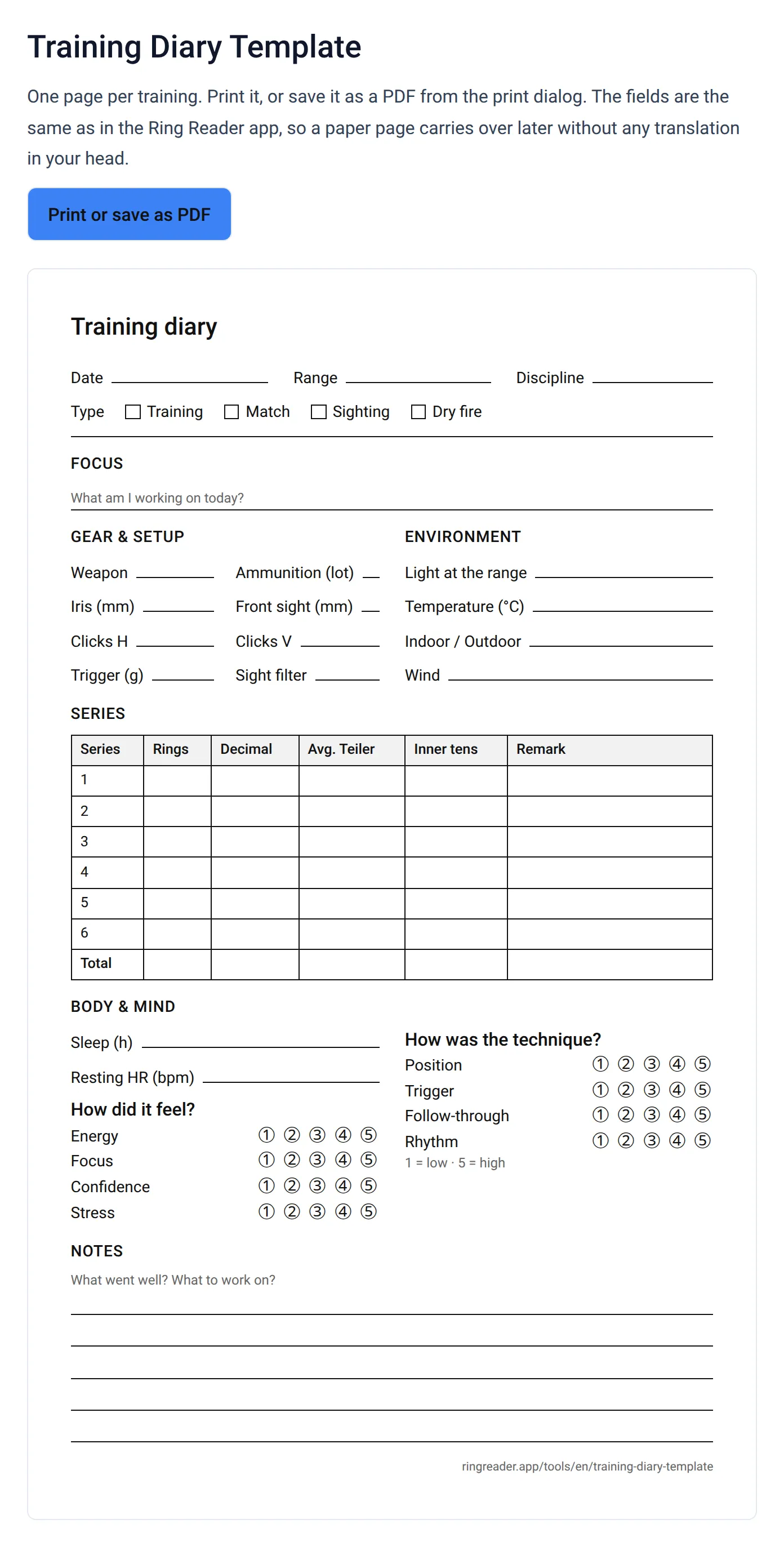
The template is a web page in A4 format with exactly these fields. A button opens your browser’s print dialog, and there you pick either the printer or “Save as PDF”. You need no account and no app for it. One page covers a training with up to six series, and for a match with more series you print two.
At the top are date, range and discipline, next to them the boxes for training, match, sighting and dry fire. Below come the focus line, the two blocks for gear and environment, the series table with rings, decimals, average Teiler and inner tens, the eight scales and five lines for notes.
How to fill in the page
Before the first shot, three things go on the sheet: today’s focus, the setup and the environment. That takes a minute and is the part most easily forgotten in the evening. You enter the series after each round, or you set the strips aside and copy them in one go after training.
The scales and the notes you fill in while the training is still fresh, ideally still at the range. A mark at “Stress 4” and a sentence like “trigger snatched in series 3, calmer after that” are worth more later than the score alone. Describe what you saw and felt. The interpretation comes later, when several pages lie side by side.
From paper into the app
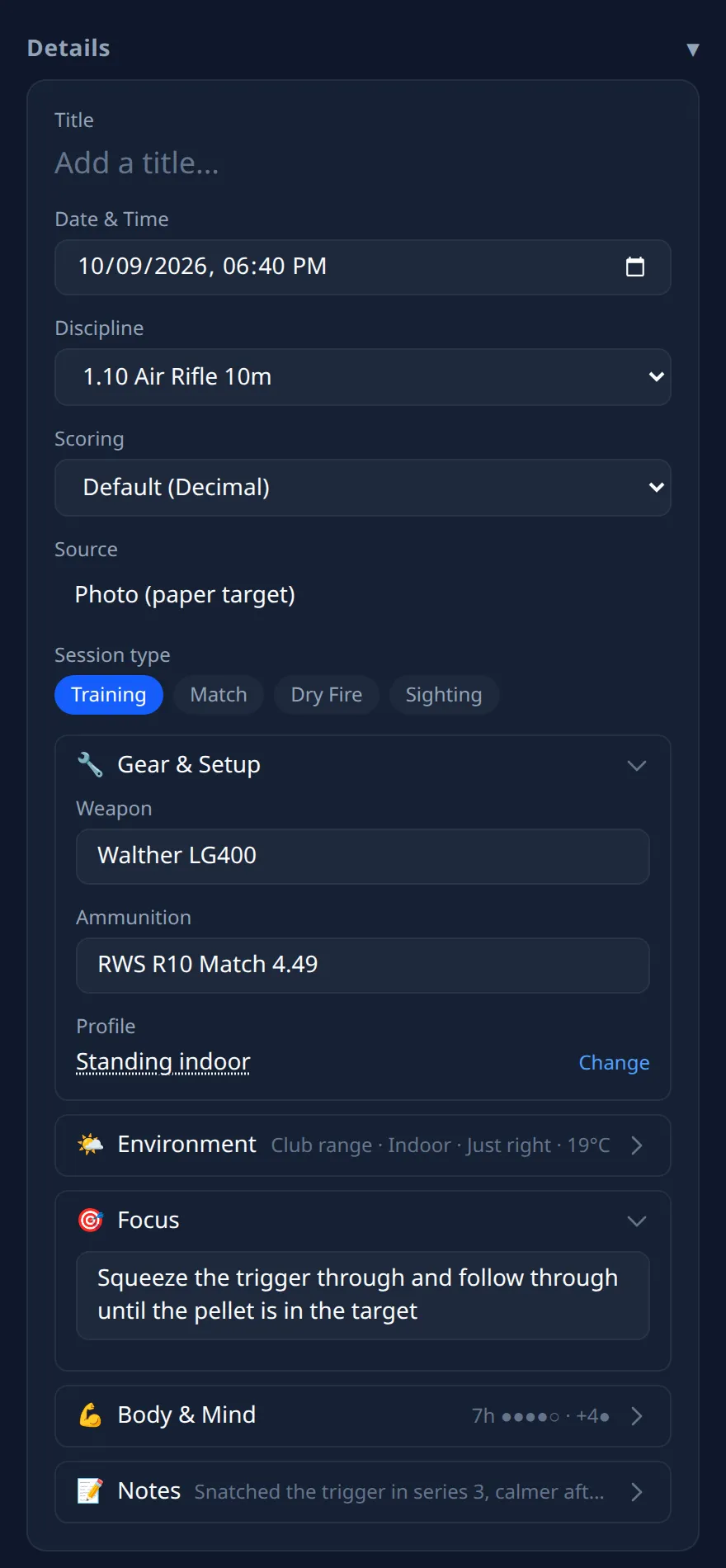
The template takes its fields from the Ring Reader app. On the result page of every series, you open the “Details” bar at the top. There sits the type with the buttons Training, Match, Dry Fire and Sighting, and below that five collapsible sections: “Gear & Setup”, “Environment”, “Focus”, “Body & Mind” and “Notes”. You tap the 1 to 5 scales, and the notes take plain text or Markdown. Collapsed, each row shows a short summary of what is in it.
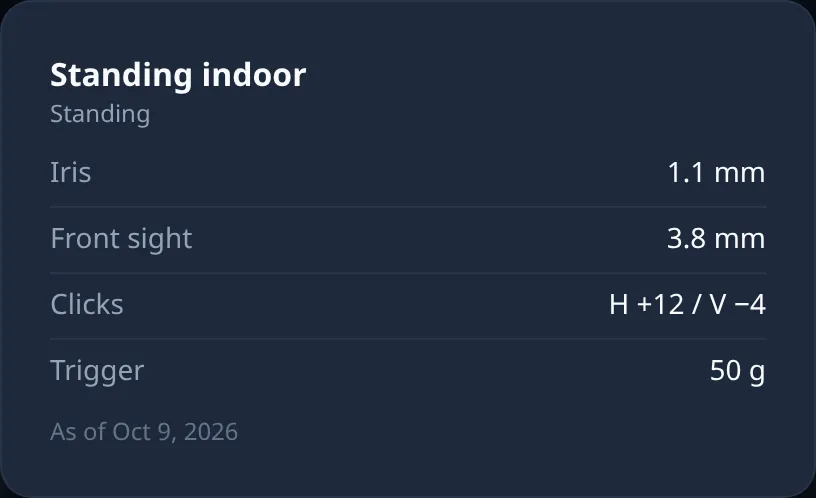
Iris, front sight, clicks and trigger live in the weapon profile attached to the series. Tapping its name shows the values.
You do not have to copy the series there. A photo of the strip delivers rings, decimals and Teiler for every shot, and the app also reads printouts from Meyton, DISAG or SIUS. From the notes of all series, the Diary tab under “My Notes” builds an overview by month, with a filter by weapon. And the “Conditions” card in Insights later works out whether ammunition, range, weekday or time of day make a difference, once you have entered them.
Scanning targets and keeping up to ten series on the device works with the free version. The training details, the diary page and Insights require a Ring Reader Pro license. Where the fields live is shown in the chapter Record Training.
Frequently asked questions
Isn’t the score per training enough?
Over months it shows whether you are improving. Why one particular week was worse is only in the circumstances next to it, and that is what the other fields are for. The average Teiler also shows progress within the same ring that the score still swallows.
Can I add old pages or an Excel spreadsheet later?
Yes. Ring Reader imports series from a spreadsheet through the “Import from spreadsheet” wizard, and there is a post on it: Import an Excel spreadsheet. Individual old series you enter through manual entry, where you tap the hits onto the target.
May I pass the template around at the club?
Yes. Print it as often as you like and put it in the youth group. The address is at the bottom of every page so anyone can print it again themselves.
Print the page for your next training.
Open the template