 Guide
Guide Training & Notes Pro
This feature requires Pro.
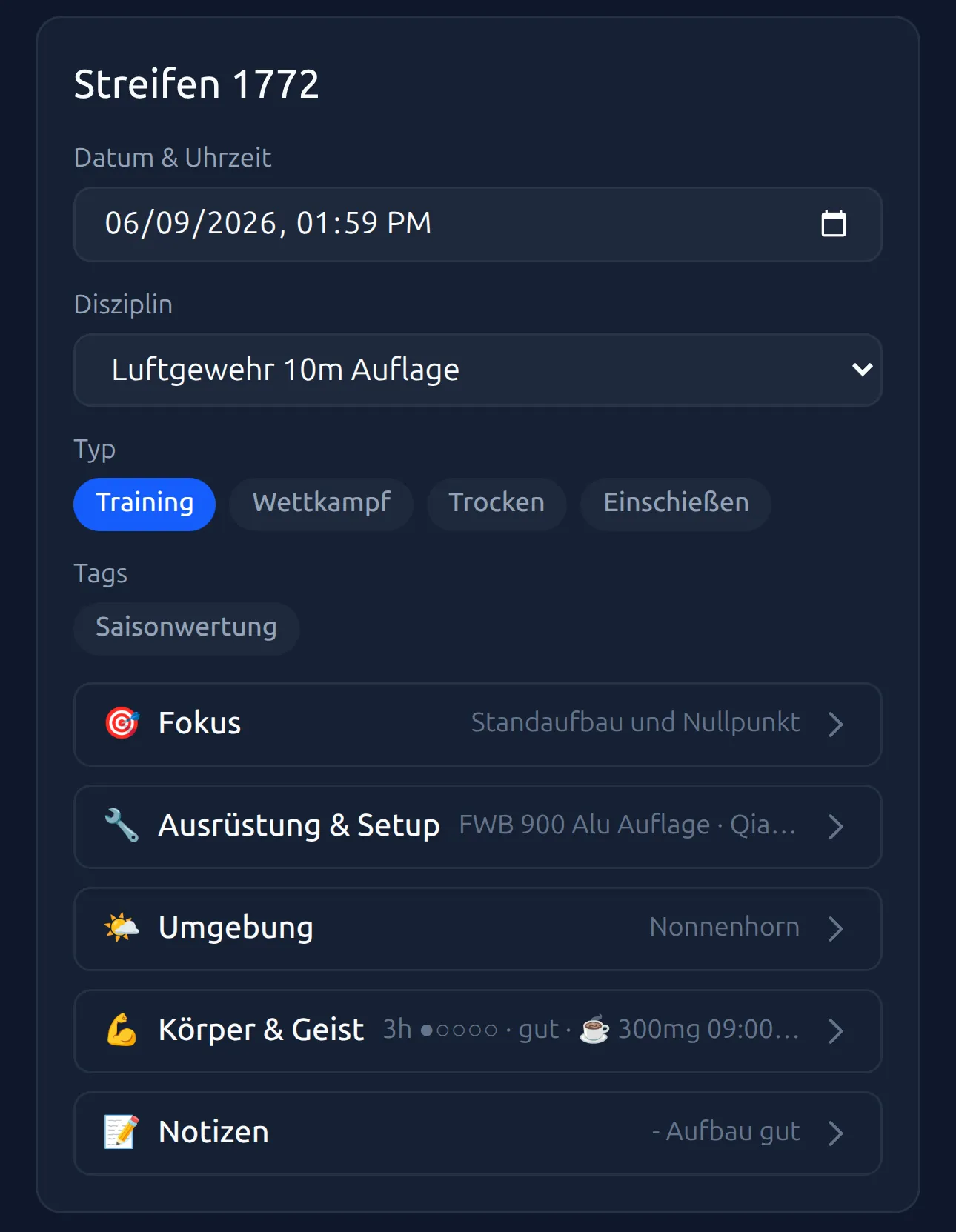
On the result page you’ll also find the detail cards. There you add training details to every series — building your digital training diary. At the top of the card are the basics: title, “Date & Time”, “Discipline” and the series type. If you’ve created tags in Settings, they appear here as well.
Choosing the training type
Under “Session type” you’ll find four buttons. Tap the one that fits:
- Training — regular club or practice shooting
- Match — a championship or friendly match
- Dry Fire — dry-fire training without firing a shot
- Sighting — trial shots to warm up
Only one can be active. Tapping the active button clears the selection again. The “Training vs. competition” card in Insights later compares the two types; more in Insights: six cards.
Five expandable sections
Below the basics come five expandable sections: “Focus”, “Gear & Setup”, “Environment”, “Body & Mind” and “Notes”. Tap a row to open it — and again to collapse it.
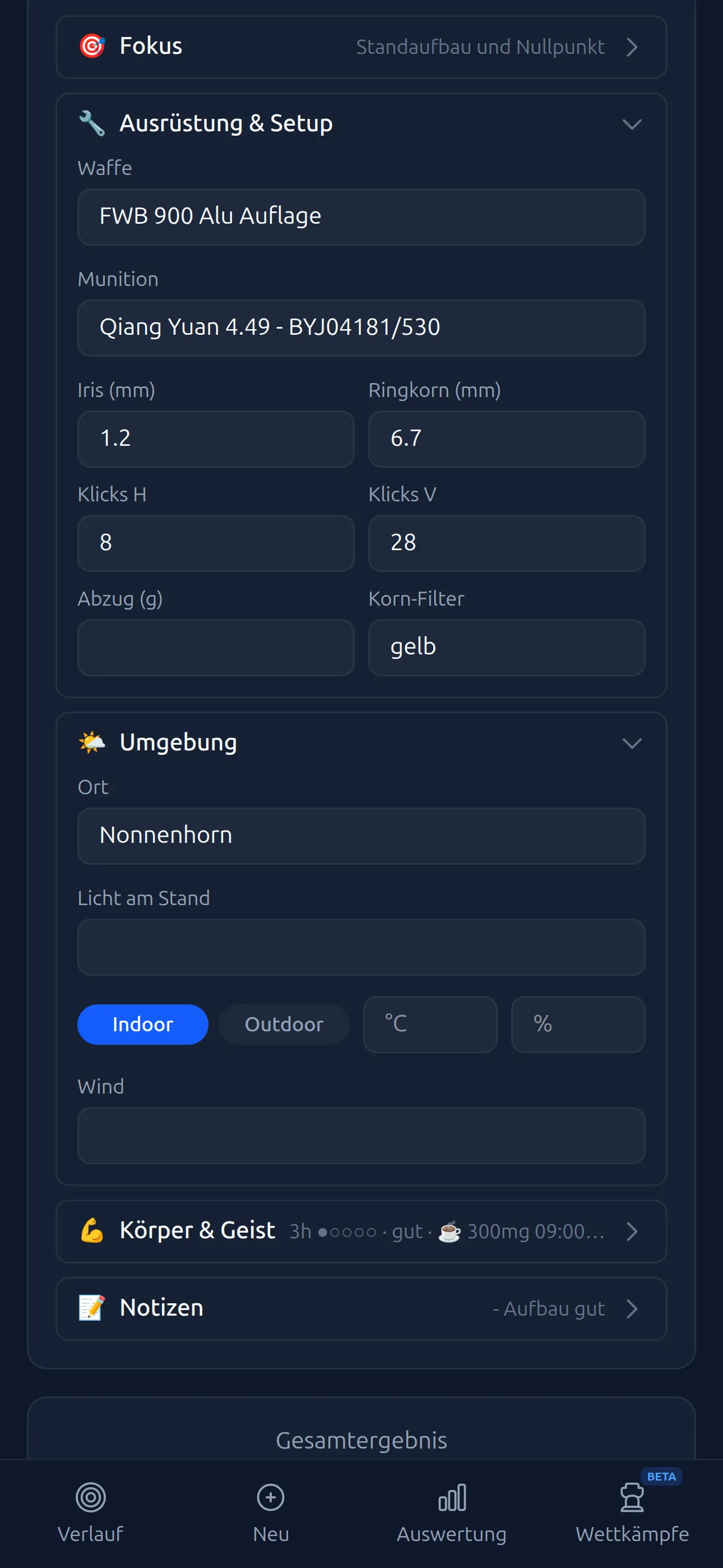
The handy part: collapsed rows show a short summary of what you’ve filled in — say, weapon and iris value, or temperature and location. So you can see at a glance what’s recorded without expanding everything. Your entries are saved as soon as you leave a field and are kept permanently.
“Focus”
A text field asking “What am I working on today?”. Note your training goal — e.g. “Hold the zero point” or “Trigger without jerking”. The entry appears as a summary in the collapsed row, so your intention stays present.
”Gear & Setup”
Here you record what you shot with:
- “Weapon” — text field or searchable picker (see below)
- “Ammunition” — text field or searchable picker, just like weapon and location (see below).
- “Iris (mm)” and “Front sight (mm)” — your sight values
- “Clicks H” and “Clicks V” — the horizontal and vertical sight adjustment; the sight click calculator works out how many clicks an offset takes
- “Trigger (g)” — the trigger weight
- “Front sight filter” — e.g. a color filter in the front sight tunnel
”Environment”
The external conditions:
- “Location” — shooting range or place
- “Range lighting” — lighting conditions as free text
- “Indoor” / “Outdoor” — choose whether you shot indoors or outdoors
- Temperature (°C) and humidity (%)
- “Wind” — mainly relevant outdoors
“Body & Mind”
Your physical and mental state:
- “Sleep (h)” and “Sleep quality” — hours plus a rating on a scale of 1–5
- “Eyes” — how your eyes are doing today, as free text
- “Caffeine (mg)” and “Caffeine time” — how much and when
- “Resting HR (bpm)” and “HRV (ms)” — e.g. from your smartwatch
Below that, under “How did it feel?”, you rate four aspects on a scale of 1 to 5 points:
- Energy — how fit and alert you felt
- Focus — how well you could concentrate
- Confidence — how sure of yourself you felt while shooting
- Stress — how tense or nervous you were
And under “How was your technique?” four more:
- Hold — how stable your shooting position was
- Trigger — how cleanly you released the trigger
- Follow-through — how well you followed through after the shot
- Rhythm — how even your shooting rhythm was
Just tap the points. 1 = low, 5 = high.
”Notes”
A free text field for anything you want to record. The placeholder reads “What went well? What to work on?” — write down whatever helps you. Markdown is supported; “Preview” shows the formatted text. These notes later appear in the training diary (see below).
Suggestions from your gear (Pro)
With Pro, the Weapon, Ammunition and Location fields become searchable pickers: whatever you’ve saved in Settings appears as a suggestion, sorted alphabetically — for weapons, those matching the series’ discipline come first. Managing Equipment & Locations shows how to create weapons, ammunition and locations. Without saved entries, the fields stay plain text fields.
The more details you record, the better you’ll spot patterns. Do you shoot worse under high stress? Does indoor make a difference? Your training diary will tell you.
Technique notes
You reach the Notes area via the menu (☰) → “My Notes”. There you can keep long-term technique notes per weapon — e.g. sight settings, position tips or equipment changes.
- Select a weapon: At the top, choose “General” or one of your saved weapons — via picker buttons if you have few weapons, via a dropdown if you have many.
- Write notes: Write in the Markdown editor. Supported: bold (
**text**), italic (*text*), lists and headings. - Preview: Switch between editing and preview to see the formatted text.
- Auto-save: Your notes are saved as soon as you leave the editor.
Training diary
The Diary tab in the Notes area shows a chronological overview of all the series notes you’ve written on the result page.
- Entries are grouped by month with date, title (or series type), result and weapon.
- Group notes appear under the group name; weapon and location sit right below; the series notes follow, indented.
- Use the weapon filter at the top (“All” or a weapon) to show only entries for a particular weapon.
- Editing isn’t possible here — open the series in question instead.
A paper version with the same fields is available as a printable training diary template.
Series notes (short, situation-specific) and technique notes (long-term, per weapon) complement each other. Use both to improve your training in a targeted way. How that turns into a plan is covered in Training Planning.