 Guide
Guide Settings
You reach the settings via the menu (☰) at the top right. The main page holds Account, Plan, Security, Language, Appearance, Notifications and Tags. Equipment, Disciplines & scoring, AI apps, Data & Privacy and Subscription & invoices have their own subpages, which you open via the rows of the same name.
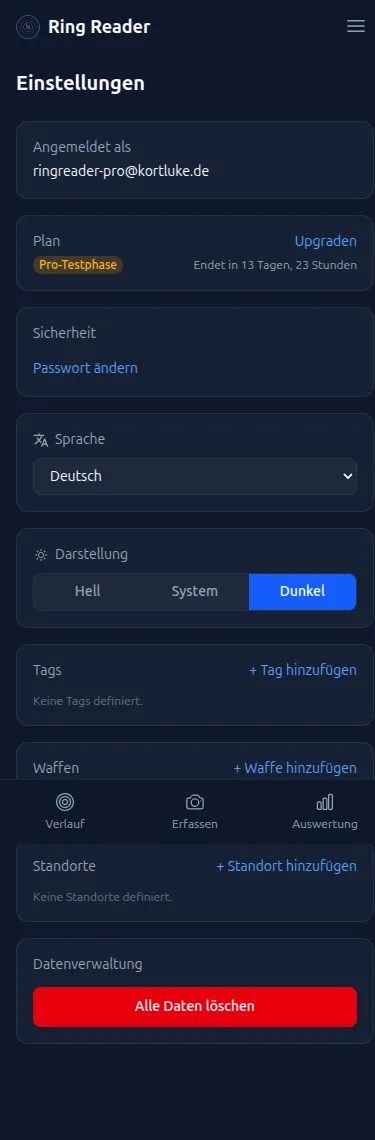
Signed in as
At the very top you see the email address you’re signed in with. Without an account it reads “Guest” with a “Create account” button; what an account gives you is explained in Account & sign-in.
Username
Your public name for Competitions — it’s shown on the leaderboards and visible to other participants. Without a username you can’t join or create a competition. Use “Set Username” to choose it and “Change Username” to adjust it at any time.
Plan
Shows your current plan. With a running Pro subscription the “Manage” link takes you to Subscription & Invoices, where you see your renewal date (during the trial: the day the trial converts), download invoices, and cancel. Cancellation works right there in the app at any time — or without signing in via ringreader.app/kuendigen. In the first subscription year the contract ends at the end of the 12-month term; after that you can cancel monthly, and the remaining full months of a pre-paid year are refunded automatically. Without a subscription you’ll find an “Upgrade” link and — as long as you haven’t bought anything — “Show onboarding”, which restarts the welcome tour.
Security
The “Change password” button opens password management. If you registered without a password (e.g. with Google), it reads “Add a password” instead.
Language
Choose your language from the dropdown. Available: Deutsch, English, Español, Français and Italiano. The change takes effect immediately.
Appearance
Three buttons control the look:
- “Light” — light theme
- “System” — follows your device’s setting
- “Dark” — dark theme
Notifications
- “Show update notifications” — controls whether Ring Reader tells you about news and new features.
- “Push alerts for challenge rank changes” (Pro) — sends you a push notification when your rank in a competition changes. On iPhone a hint appears instead: add Ring Reader to your Home Screen first, then you can enable push here — see Install the App.
Tags
Tags help you categorize series — e.g. “Standing”, “Kneeling” or “Championship”.
- Tap “Add Tag” to create a new tag.
- You can edit or delete existing tags.
- Tags are used for filtering in the history. When you delete one, Ring Reader shows how many results use the tag.
Training group features
The “Training group features” switch shows or hides the Groups tab in the navigation. It only appears with a real account; more in Training Rosters.
Equipment (Pro)
The “Equipment” subpage manages weapons, ammunition, gear (clothing and attachments), weapon profiles and locations. All of it is covered in Managing Equipment & Locations.
Disciplines & scoring
The “Disciplines & scoring” subpage shows all disciplines grouped by Rifle, Pistol, Light (laser) and Other, with a search field. Per row you choose the scoring mode and whether the discipline is one of yours.
Scoring
Here you set the default scoring mode per discipline: “Decimal” (e.g. 10.3) or “Whole Rings” (e.g. 10). The setting acts as the default for new series and can be overridden per series.
My disciplines
Under “My disciplines” you select which disciplines are relevant to you: only the selected ones then appear in discipline lists and in public challenges. With no selection, everything is shown. Which settings are worth making at the start of the season is shown in Season start: set up your training diary.
If an import detects a discipline outside your selection, Ring Reader marks the result with the note “Not in your disciplines” — often a sign that the discipline was misdetected and deserves a second look.
AI apps
The “AI apps” subpage lists connected AI assistants with the date they were last used and disconnects them via “Revoke”. Connect Ring Reader + AI shows how to set up a connection.
Data & privacy
As a signed-in user you have four areas on this subpage:
- “Export my data” (Pro): Downloads all your cloud data as a ZIP file with CSV files.
- “Delete my data”: Permanently deletes all shooting data (series, results, tags, weapons, locations, groups). The account and purchase history are preserved. Confirmation by typing “DELETE” is required.
- “Delete my account”: Permanently deletes the account and all data; a running subscription is canceled as part of the deletion. Confirmation by typing “DELETE MY ACCOUNT” is required. If you sign in again with the same email, a one-time purchase can be restored.
- “Shared links”: All result pages you’ve shared as a link, with title, address and date. “Delete” invalidates a link immediately; more in Share a Result.
Deletion cannot be undone!
Cloud sync is active automatically with Pro. There’s no sync setting on this page. In History you’ll find the “Sync all” button to sync manually.