 Guide
Guide Creating Groups Pro
This feature requires Pro.
A group bundles several series into one combined result with its own statistics and notes — say, for a complete competition, a training week or a themed comparison.
The “Groups” tab in History
The History page has the tabs “Series”, “Groups” and “Calendar”. The “Groups” tab shows your groups with statistics summarized across the series they contain. With “Convert to virtual … shots” it converts all groups to a common shot count; converted groups carry the “virtual …” badge.
As long as you haven’t created a group yet, the “Groups” tab shows: “No groups yet. Select series in History to create one.”
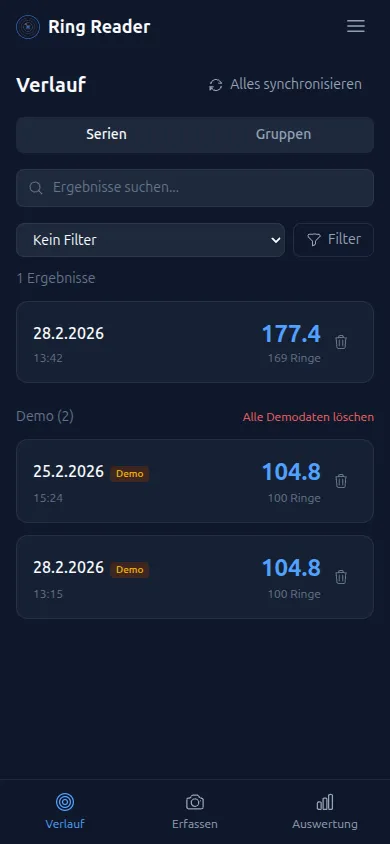
Creating a group
- Open the history and stay on the “Series” tab.
- Press and hold one series and tap the others you want to combine.
- Tap “Group”, give it a name in the dialog and confirm.
Automatic groups
Many groups come about on their own, without you selecting any series:
- Imports with several series — say, a Meyton printout containing multiple series — create a group automatically.
- Photos with several targets — if Ring Reader detects multiple targets in one photo, it automatically combines the series into a group.
Match competitions score series groups: a matching group counts as a match automatically, there’s nothing to submit. More on this in the chapter Competitions.
Group page
The group page shows the merged shot pattern of all series, the stat cards across all shots, the trend and distribution charts, and the list of series. You change the name right in the heading; the minus on a series removes it from the group. If you change date, discipline, weapon or location on the group page, it applies to all the series it contains.
Group notes
Every group has its own “Notes” — separate from the notes on the individual series. Perfect for commenting on a whole competition or training block without describing each series individually. The notes support Markdown (headings, bold, lists) and are synced with your other devices.
Controlling competition scoring
On the group page you’ll find the “Do not submit to challenges” switch. If you enable it, the group doesn’t count in the scoring of running Competitions.
Deleting a group
On the “Groups” tab, tap the group’s trash icon. In the “Delete this group?” confirmation dialog you can additionally choose:
- “Also delete all X series in this group” — if enabled, all the series it contains are deleted along with it.
If not enabled, only the group is deleted — the individual series remain in your history. Series that are also in another group are kept in any case.
Create a group for each competition or training block — for example “Club Championship 2026” or “Week 8 Training”. This lets you see whether you’re improving over the weeks.