 Guide ← Back to app
 Managing Equipment & Locations Pro
This feature requires Pro.
You manage weapons, ammunition and locations directly in Settings. They appear there as their own sections, in exactly this order: Weapons, Ammunition, Locations.
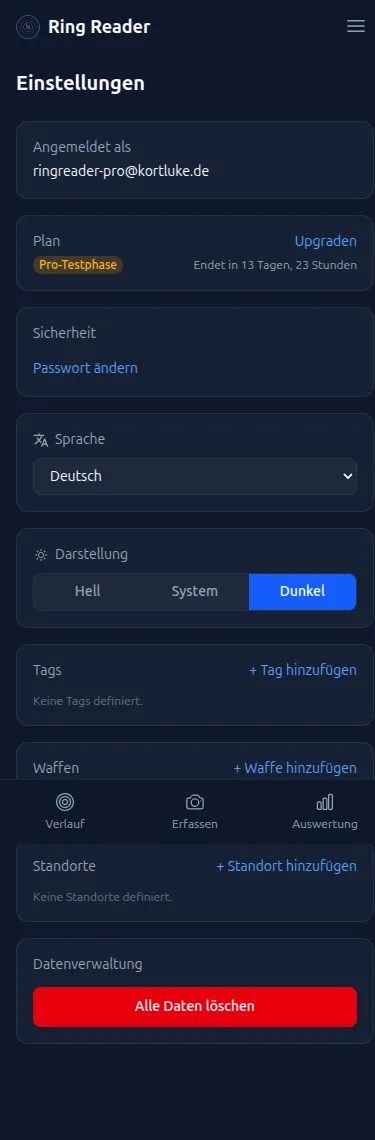
Managing weapons
In Settings you’ll find the “Weapons” section.
- Tap “Add Weapon” to create a new weapon — e.g. “Feinwerkbau 800X”.
- You can assign each weapon a type: “Rifle” or “Pistol”.
- As long as no weapons are saved, it shows: “No weapons defined.”
- Saved weapons appear as searchable suggestions in the “Weapon” field of the training details — sorted alphabetically, with weapons whose type matches the series’ discipline listed first.
Managing ammunition
Directly below comes the “Ammunition” section.
- Tap “Add Ammunition” to create an ammunition type — e.g. “RWS R50 lot 3042”.
- As long as no ammunition is saved, it shows: “No ammunition defined.”
- You pick saved ammunition per series in the “Gear & Setup” section of the training details — the suggestions are sorted alphabetically.
Create a separate entry per lot (e.g. “RWS R50 lot 3042”). That way you can tell later whether a new lot shoots differently from the old one.
Managing locations
Below that you’ll find the “Locations” section.
- Tap “Add Location” to create a new range.
- As long as no locations are saved, it shows: “No locations defined.”
- Saved locations appear as searchable, alphabetically sorted suggestions in the “Location” field of the training details.
Why is this useful?
If you own several weapons, test different ammunition types or shoot at different ranges, this management helps you compare. You can see which weapon you shoot better with, which ammunition shoots best, or whether a particular range affects your result. You can filter by weapon and location in History and in Analytics.
Set up your equipment once in Settings. After that, you can quickly select it for each series via the search field.