 Blog
Blog
Insights: six cards and the question of enough data
Summary: In Analytics you find the “Insights” view. Six cards analyze your series, for example whether your first shot is worse than the others or where your bad shots tend to go. Every card knows three possible answers: a finding, a note like “No measurable difference”, or “Not enough data yet”, each with the matching numbers.
In the “Analytics” tab, pick the “Insights” entry. In place of the scoring mode, a dropdown with your discipline families appears next to it, say air rifle or air pistol. The cards always refer to one discipline only, because a supported shot and a freehand shot do not belong in the same statistic. The “Based on” line below shows you how many series and shots went in.
| Card | Question | Requirement |
|---|---|---|
| ”Shot position in the series” | Does one shot number drop off or stand out? | 10 series with a multiple of 10 shots |
| ”After a bad shot” | How does the shot after a bad one turn out? | 10 shots each after bad shots and after normal ones |
| ”Rings left on the table” | What would a centered sight bring? | 5 series with measured positions |
| ”Training vs. competition” | Do you shoot differently in a match? | 5 series each of the session types Training and Match |
| ”Where do the bad shots go?” | Do your worst shots cluster in one direction? | 10 bad shots with a measured position |
| ”Conditions” | Does ammunition, location, weekday, time of day or a training gap make a difference? | 5 series per group, ammunition and location assigned |
How a card is created
First the app checks whether there is enough data: ten shots or series for the shot-level questions, five series per group as soon as series are compared. If the data is not enough yet, the card reads “Not enough data yet (3 of 5).” The bracket shows you how far you still are from a result.
If there is enough data, the app checks whether the difference could be chance. A finding appears only when the 95 percent confidence interval excludes zero and the difference is at least 0.05 rings per shot, which is half a ring per ten shots. If the test fails, the card shows a line like “No measurable difference between training and competition.” That is a result too: your data simply shows no such pattern.
The app defines a bad shot from your own shots: the worst ten percent within the chosen discipline. The sentences on the cards are prewritten texts the app fills with its numbers. No language model takes part in the calculation.
Shot position and the shot after
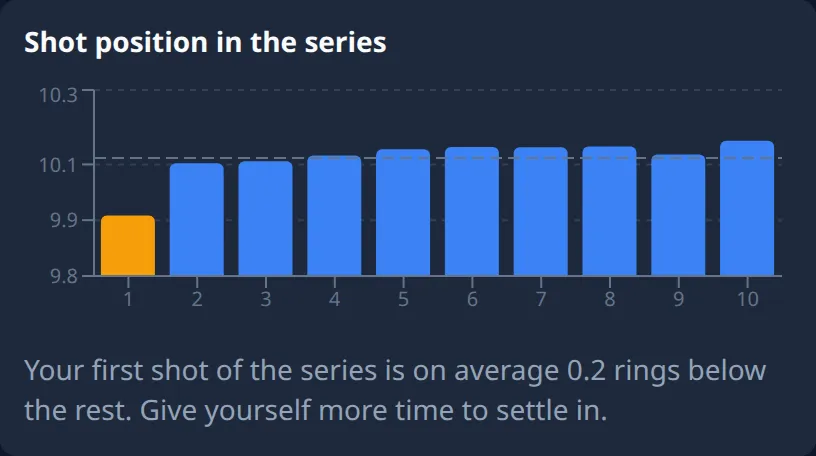
The “Shot position in the series” card stacks your series in blocks of ten and calculates the mean for shots 1 through 10. Series of 20 or 40 shots are split for that; a 15-shot series is not counted. If a deviation survives the test, the card names the position and the gap in rings. For the first shot it adds “Give yourself more time to settle in.”, for the last it asks “Already thinking about the result?”. Counting follows the firing order. On paper targets you set the order through “Order” on the result page.
“After a bad shot” compares every shot that follows one of your bad shots with the shots after a normal one. If the following shot sits at your usual level, the card says a bad shot does not throw you off. When it drops, the card names the gap and suggests a short break, and when the shot after a bad one even comes out better than usual, it says you refocus well.
Rings left on the table
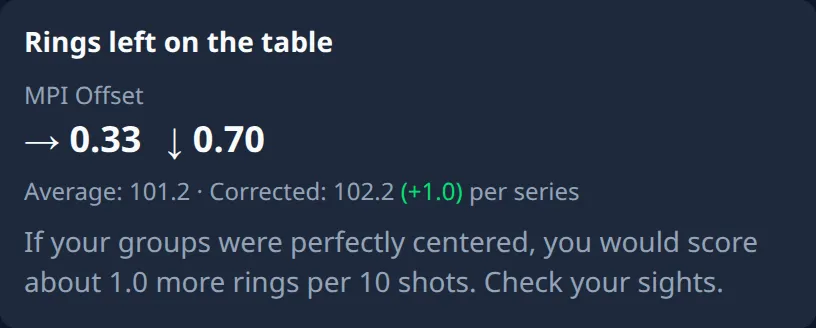
This card shifts every series so that its group center sits on the target center and rescores all shots at the shifted position. The difference to the real score corresponds to the gain a properly set sight would have brought, in rings per ten shots. Shots with an estimated position and imports without coordinates are left out. Only from half a ring per ten shots upward, and only when the gain holds across all your series, does the card name the number and close with “Check your sights.” If your groups sit cleanly in the middle, it tells you that as well. How the same calculation looks on a single series is covered in the post on the corrected score. How to read the mean point of impact over weeks is in What the mean point of impact says about your technique, and how many clicks the offset takes on your sight in Adjusting sights with numbers.
Training vs. competition
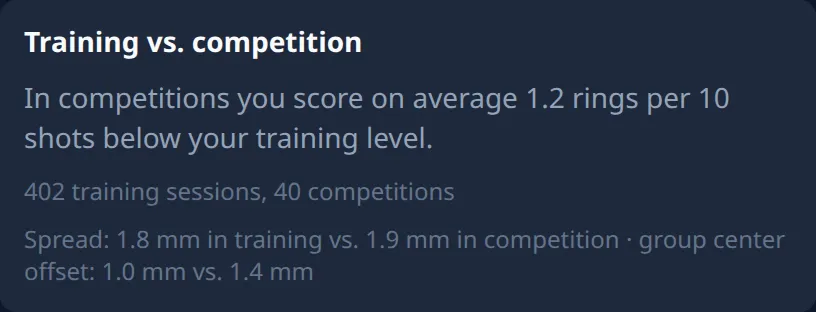
This card is based on the “Session type” field on the result page with the options Training, Match, Dry Fire and Sighting. Series without a type are not counted. Once there are five series of each type, the app compares the mean per shot and writes the result in rings per ten shots on the card, with a line like “12 training sessions, 6 competitions” underneath. With a finding, the spread in millimeters and the distance from group center to target center follow, separately for training and competition. That shows you whether a match opens up your group or shifts it as a whole. You set the type on the result page or in History for many series at once; the Record training chapter shows you the buttons.
Where do the bad shots go?
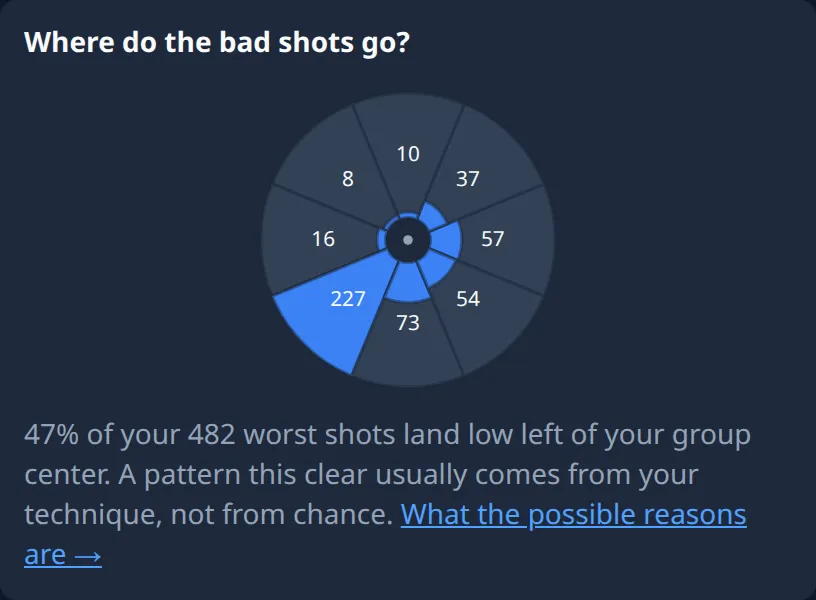
For every series the app finds the group center and looks in which direction your bad shots stray from it, in eight sectors with labels like “high right” or “low left”. There is a finding when at least a quarter of the bad shots sit in the fullest sector and the share also stays statistically above the eighth that chance would put into every sector. Then the card reads something like “47% of your worst shots land low left of your group center.” If the bad shots spread evenly, the card says there is no direction pattern. Now you know what to watch for at your next training. Which causes coaches check first for bad shots in one direction is shown on the shot correction chart.
Conditions
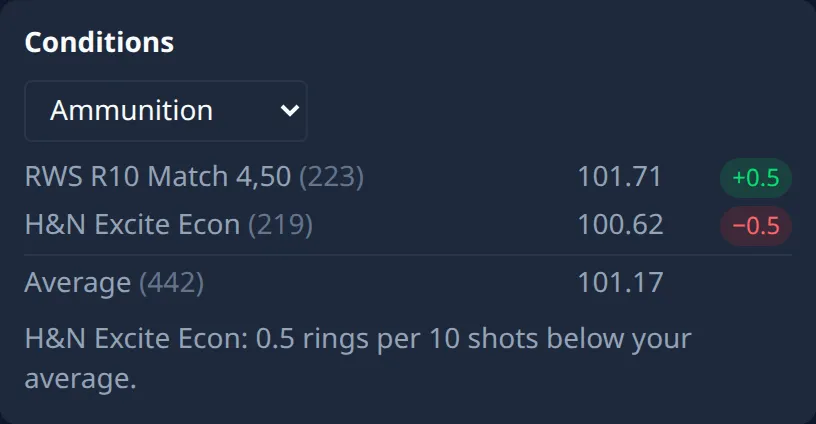
The sixth card has its own dropdown with Ammunition, Location, Weekday, Time of day and Training gap. It sorts your series into groups by the chosen attribute, shows the series count and the mean per shot for each group, and tests every group with at least five series against all the others. A finding names the group and its gap to your usual level in rings per ten shots; otherwise the card reads “No solid difference between the groups.”
The card only knows ammunition and location when you have assigned them to your series; how to set them up is in the Managing Equipment & Locations chapter. If that is missing, it asks you to, and a line like “23 series without assignment” keeps count. Weekday and time of day come from the date of the series, the training gap from the days since the previous series in the same discipline family, in steps like “2-3 days” or “15+ days”.
If you have connected an AI app to Ring Reader, it can fetch the same analyses and learns along the way that “no effect” is a result. The setup is in the Connect Ring Reader + AI chapter.
Frequently asked questions
Why does a card show “Not enough data yet” when I have plenty of series?
Every card counts only what it can use. For “Shot position in the series” that means series with a multiple of 10 shots, for “Training vs. competition” series with a session type set. The position cards need measured positions on top. Series of other discipline families stay out as well.
Is “no effect” an error?
No. The card did the math and did not find the pattern in your data, or the difference is below half a ring per ten shots. For your training that means you can ignore this topic.
Does the date filter apply to Insights too?
By themselves the cards compute over your whole archive of the chosen family, regardless of the three months Analytics otherwise presets. If you set a date range or a weapon in the filter yourself, that applies to the cards as well.
Open Analytics and see which of the six cards is already computing for you.
Take a look