 Guide
Analyze your Steyr Smartrix data
Ring Reader works with Steyr Smartrix. You import your pistol’s recordings and see for every trigger pull how steady your hold was, how you built up the pressure and how far the muzzle moved at the shot. Connect a series to its pulls, and Ring Reader shows you at every hit whether you lost the rings while aiming or only at the break.
Everything that runs on your device is free, even without an account. With Pro, you also have your Smartrix data on all your devices and can discuss it with an AI (see Free and with Pro).
What you need
- A Steyr EVO 10 E SX, or an EVO 10 E or LP 10 E retrofitted with Smartrix. The retrofit puts the same electronics into the grip as the SX, so the files are the same too.
- A USB cable to connect the pistol to your computer; the pistol’s port is USB-C. For every recording, the Smartrix creates a folder in the pistol named after the date and time (e.g.
20261106_131054). Inside is one.sssfile per trigger pull. - Ring Reader in your browser or as an app. You don’t need an account.
Connect the pistol to your computer by USB. It shows up there as a USB drive with the folders of your recordings. This usually works the same on a phone, provided it can read USB drives.
Import the files
- Tap New → Import a file and choose “Import Smartrix files”.
- Tap “Choose folder” and, on the pistol’s USB drive, pick the folder with all recordings or a single recording folder. If your phone can’t pick a folder, use “Choose files” and select the
.sssfiles. - Ring Reader tells you how many new files it added and lists every day under “Already imported” with its pulls: live, dry and not aimed. “Analyze” opens the day in the motion analysis.
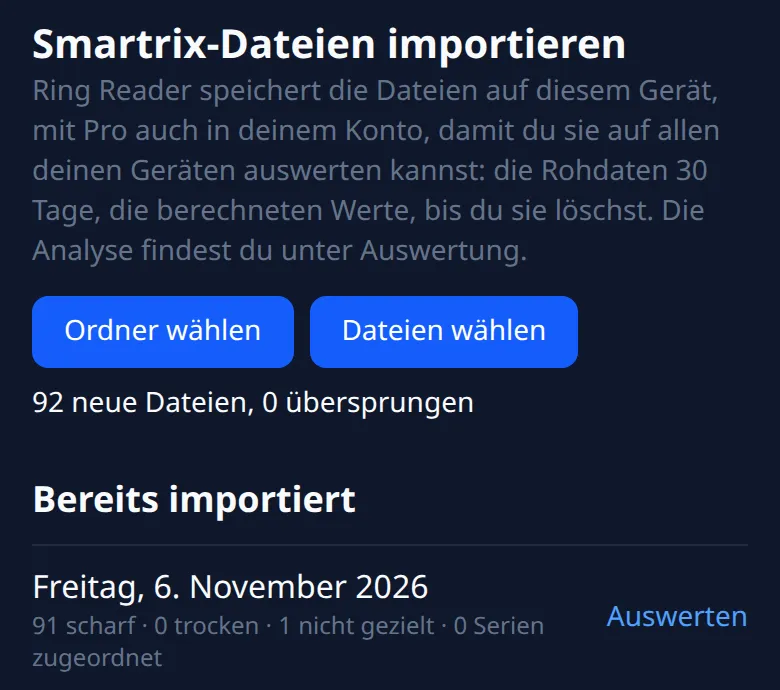
You can import all of the pistol’s recordings again after every training session: Ring Reader only adds the files it doesn’t have yet.
Ring Reader keeps the raw data of every pull for 30 days from the import, and the computed values until you delete them. After 30 days you still see all the numbers, but no more traces. Splitting a block, joining blocks and marking pulls as “not aimed” only work while the raw data is there.
Dry or live
Ring Reader sorts every pull on its own: it recognizes live shots by the jolt at the release and by the trigger force. Pulls with at most two minutes between them form a block, and a block is either all dry or all live. If the app gets a block wrong, open it under Analytics → Smartrix motion analysis → “Details: days and blocks” and switch it with “whole block dry” or “whole block live”.
Ring Reader also recognizes whether you shot freehand or supported. If that’s wrong, fix it in the block with “Mark as supported” or “Mark as freehand”. With ✂ in the list of pulls you start a new block from there, and “join with the previous block” merges two blocks.
Not aimed
Some pulls never count, for example when you were just handling the pistol. Ring Reader marks a pull as “not aimed” when less than 2 s were recorded, the hold time was under 0.5 s, the pistol was canted more than 10°, or it pointed more than 10° higher or lower than for the other shots of the block.
“Show shots” opens the list of pulls in a block:
- ✕ takes out a pull that shouldn’t count.
- A pull the app sorted out comes back with “count it after all”.
- “back to automatic” undoes your choice.
The Smartrix motion analysis
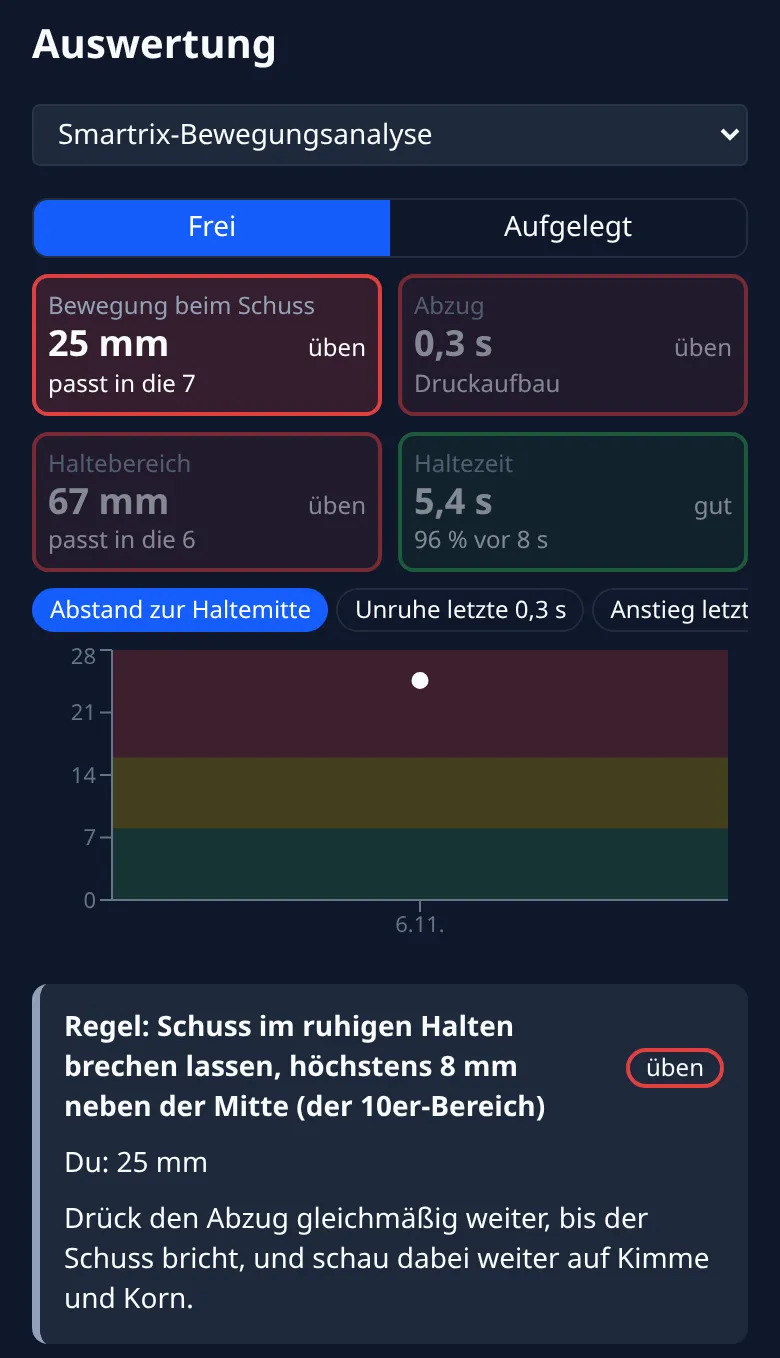
Under Analytics, pick the view “Smartrix motion analysis” at the top. It appears as soon as there is Smartrix data on your device. Below it, switch between “Freehand” and “Supported”.
The four tiles
The tiles show your latest training day. Color and word tell you where you stand (good, borderline or needs work), and the arrow tells you whether you are better or worse than on the days before.
| Tile | What it shows | Rule |
|---|---|---|
| Movement at the shot | how far from the center of your hold the shot breaks, in mm on the target | at most 8 mm, i.e. within the 10 |
| Trigger | how long you build up the pressure before the shot | smoothly over at least 2 s |
| Hold size | how large the area is in which your aim point wanders during the last second before the shot | small enough for the 10 (16 mm) |
| Hold time | how long it takes you from settling on the target to the shot, plus the share of shots before 8 s | shoot before the eighth second, put the gun down at 10 s |
For movement and hold size, the tile also tells you which ring that fits in, e.g. “fits in the 7”.
Chart and cards
Tap a tile to see its trend per training day below it, plus a few cards:
- Gray cards state the rule, your value and what you can do.
- Blue cards show what your own hits say, such as “When the shot breaks close to the center of your hold, you score … on average”. They need connected series.
- Dashed cards tell you what’s still missing.
Dry vs. live: once you have at least 20 dry and 20 live pulls within the last 30 days, Ring Reader compares the movement at the shot. If your pistol moves clearly more live than dry, the real shot is throwing you off. Follow-through (staying on the trigger for 1–2 s after the shot) can only be measured dry.
Details: days and blocks
“Details: days and blocks” lists every day with its blocks. A block shows its values as a table, split into dry and live. Tap a time in the list of pulls to see the path of your aim point over the last 3 s next to the trigger pressure. Under “Comparison”, pick two blocks to see what changed. “What do the numbers mean?” at the bottom of the page explains every value.
Connect a series to its pulls
From your series, Ring Reader knows where every shot hit; from the Smartrix, how you released it. Connect the two, and you see the movement before every hit.
You need:
- the series in Ring Reader, from the same day and with exact hit positions, for example from a scanned target or an import from an electronic range,
- that day’s Smartrix files on the same device.
To connect:
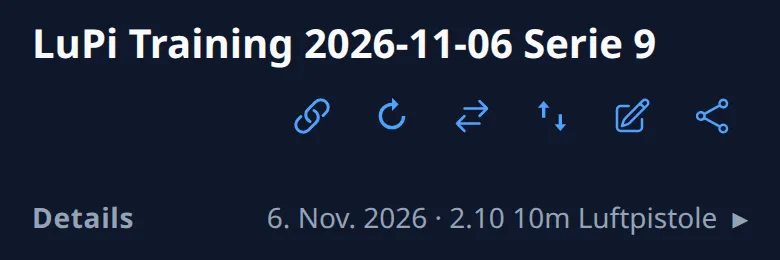
- Open the series. In the row of icons under the title you’ll find the chain icon “Connect to Smartrix”.
- Tap it. If the match is clear, Ring Reader connects the series right away and confirms, e.g. “Connected to 10 Smartrix pulls.” Otherwise the “Match series” window opens.
Ring Reader looks for a run of live pulls whose movement at the shot fits your hits. That also works for paper targets whose time is only approximate. If the movement isn’t conclusive, Ring Reader takes the last pulls before the series’ time. That is reliable mainly for series from an electronic range that are saved with an exact time, such as from WM-Shot. Supported, the pistol hardly moves, so the app matches supported series mostly by time.
Check the match
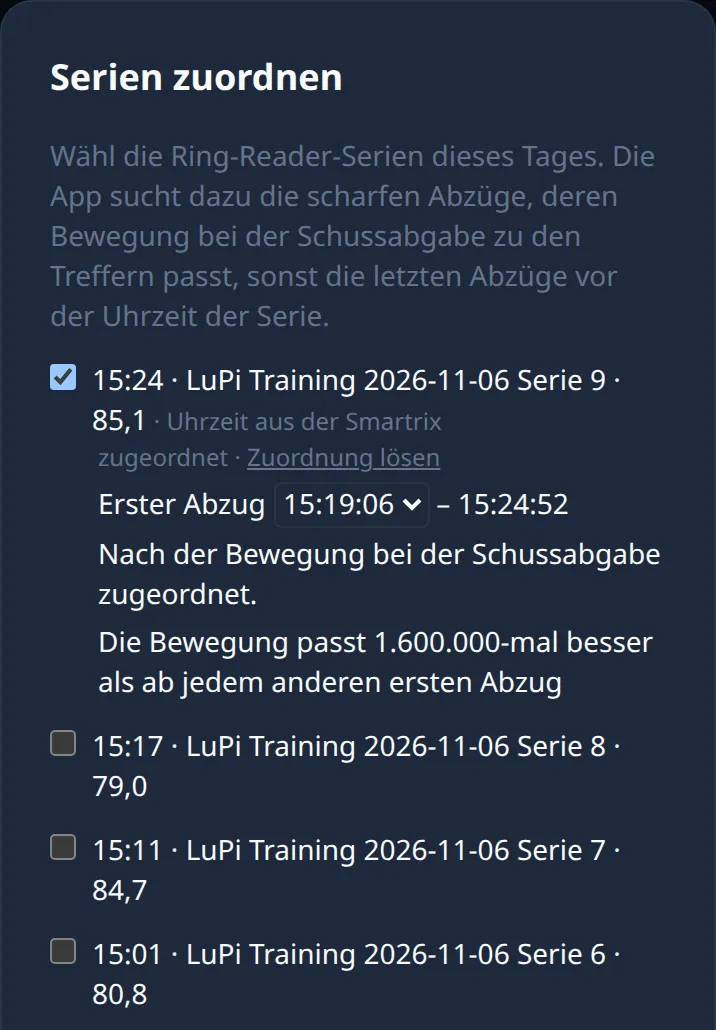
In the “Match series” window, tick the series of the day, tap “Check” and then “Save”.
- “First pull” shows the pull the series starts with, followed by the time of the last one. Check the first pull, especially if you fired sighters before the series: it has to be your first record shot. If it’s wrong, pick it yourself.
- On “Weak match” or “Match not conclusive”, take a particularly close look.
- “Remove match” undoes a connection.
On the results page, “Change match” opens the same window. To connect several series of a day at once, use the motion analysis: open the block, then “Match series”.
The Smartrix records every trigger pull, including sighters and dry pulls. Ring Reader looks for the record shots of a series as one run of pulls: sighters before the series do no harm, dry pulls between the record shots do.
Shot order and shot times
Suggested shot order on paper
On a paper target with several shots, it’s often unclear which hole was which shot. After connecting, Ring Reader compares the movement of every pull with the hits and suggests an order in the card “Smartrix suggests the shot order”:
- “About 7 of 10 in the right place” tells you how sure the suggestion is. Unsure shots have a dashed outline, and possible mix-ups can be swapped with one tap, e.g. “Swap 3 ⇄ 4”.
- “All on one target” or “5 per target” tells the app how many shots were on one target.
- “Apply” saves the order, “Dismiss” leaves everything as it was, and “Order in the list” lets you sort the shots yourself. Right after applying, “Undo” takes it back.
The card only appears when you can change the series’ order, never for supported series, and only when the stored order doesn’t fit already.
Shot times
When you connect a series, every shot gets the time of its pull and the series gets the time of its last shot; the results page then says “Series time and shot times from the Smartrix.” The Score Trend chart on the results page then also shows the Shot time of every shot, the time since the previous one. With Pro, the Shot time card under Analytics → Insights also shows across many series whether your score depends on it. If the series already has shot times from the range, Ring Reader keeps them. If you remove the match, the times are removed too, and the series gets its old time back.
Aim or break: the hold center
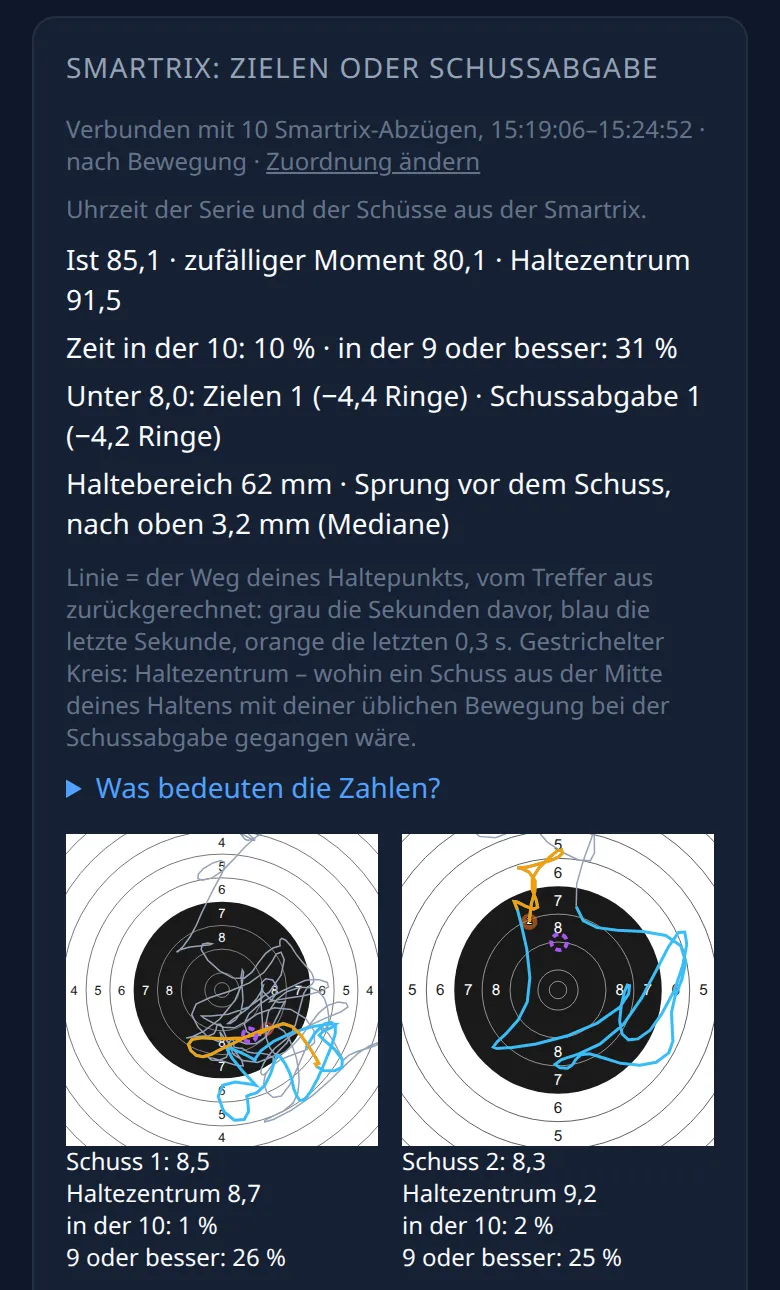
On the results page of a connected series you’ll find the card “Smartrix: aim or break”. It shows a small target for every shot:
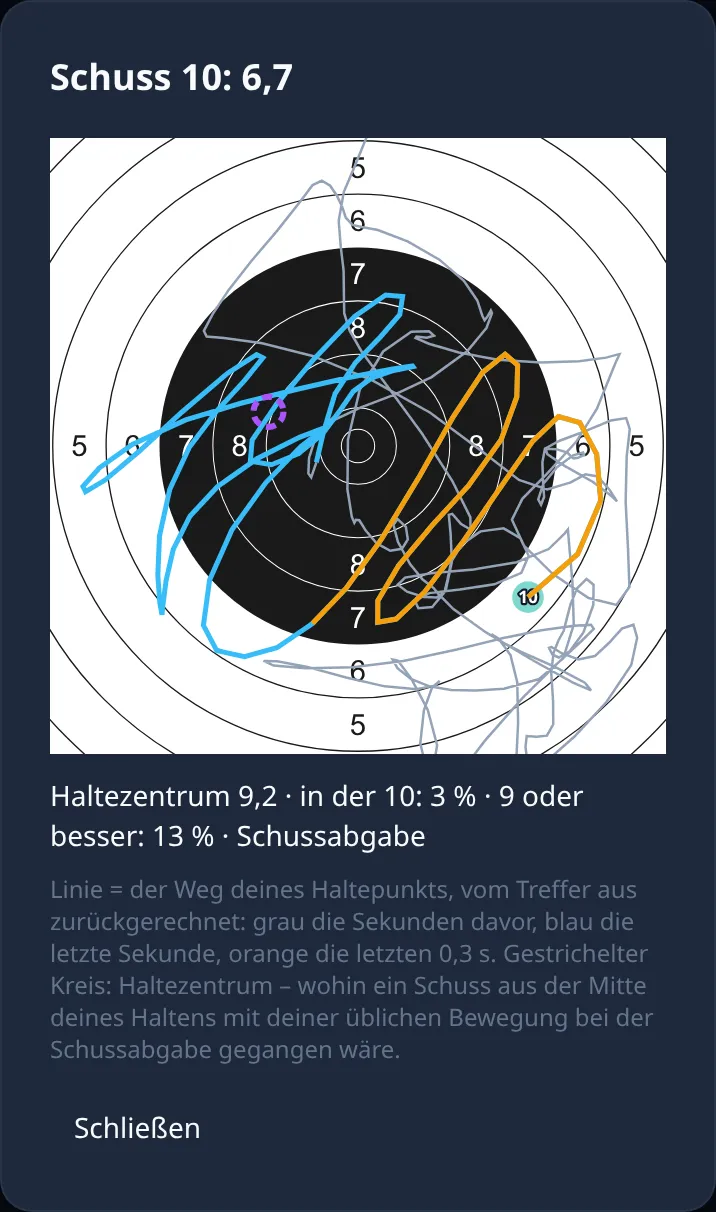
- The line is the path of your aim point, traced back from the hit: gray the seconds before, blue the last second, orange the last 0.3 s. It ends exactly on the hit.
- The dashed circle is the hold center: where the shot would have gone if you had released it calmly from the middle of your hold, with your usual movement at the break. Usual means the average of this series, which your sight setting compensates for anyway. That’s why the circle is deliberately not in the middle of the line.
Tap a shot to see it large:
Reading a shot
- Circle in the 10, hit far away: your hold was good; you lost the rings at the break, for example by jerking the trigger or flinching.
- Circle close to the hit but outside the 10: the release was clean, but your hold was unsteady or on the wrong spot.
- The distance from the circle to the hit is this shot’s error at the break, beyond your usual movement.
That’s how Ring Reader judges every shot below 8.0: if the hold center is below 8.5, the aim was already off (Aim). If it is 8.5 or better, the shot only went astray at the break (Break).
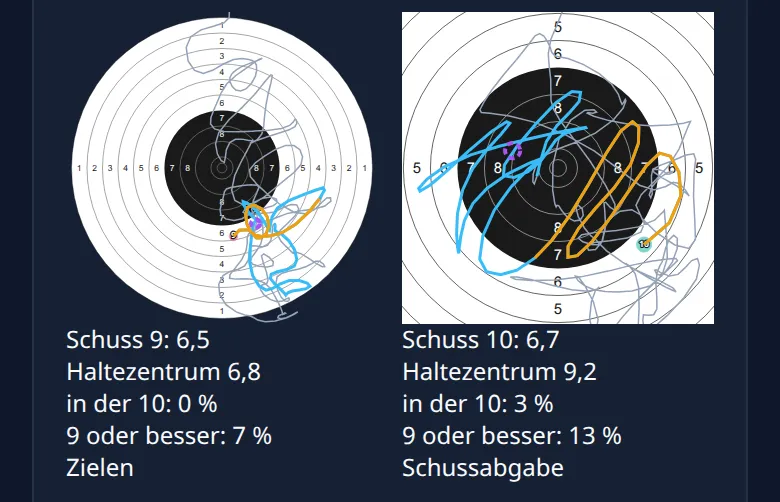
In the picture above, the hold center of shot 9 (6.5) is already at 6.8, right next to the hit: lost while aiming. For shot 10 (6.7) it is at 9.2; only in the last 0.3 s (orange) does your aim point wander off to the lower right: lost at the break.
Reading a series
The top of the card shows the values of the whole series, e.g. “Actual 85.1 · random moment 80.1 · hold center 91.5”:
- Actual is your score.
- Hold center is the sum of the rings at the hold centers. The difference to your score is what the break costs you, here 91.5 vs. 85.1, so a good 6 rings.
- Random moment is what you would have scored on average if the shot had broken at any moment of the last second. If your score is above it, you caught good moments.
- Time in the 10 and in the 9 or better tell you what share of the last second was in those rings.
- Below 8.0 splits the shots below 8.0 into aim and break, with the rings they fall short of 10.9.
- Hold size and jump before the shot are the medians of the series: half of the shots are above, half below.
Two examples from real training sessions: supported, the break often costs almost nothing. In a series of 100.9, the hold center was at 100.4. Freehand looks different: on a training day with nine series, the hold center averaged 8.85 per shot and the score 7.93. The break cost almost one ring per shot there. Of the 42 shots below 8.0, Ring Reader put 20 down to aiming and 22 to the break.
The limit: a movement you make exactly the same way on every shot counts as “usual” and is already part of the hold center, just as the sight setting compensates for it. That’s why you don’t see it in the distance from circle to hit. It shows in “jump before the shot” instead: how far your aim point rose in the last 0.3 s before the shot.
What to practice
- Mostly Break: work on the trigger. Dry fire in which the shot surprises you helps here: keep pressing smoothly until the shot breaks, keep looking at the sights and stay on the trigger for another second or two.
- Mostly Aim: work on your hold. Holding drills, strength and endurance for shoulder and arm, and a good natural point of aim help here.
- Circles always on one side: check your stance and your natural point of aim, or adjust your sights.
- Big jump before the shot: if the muzzle jumps right at the release, that’s typical of flinching. Mix dry shots into your live series and shoot a few series at a blank target.
Free and with Pro
Free, even without an account:
- importing your
.sssfiles, - the motion analysis with tiles, cards and charts, dry and live,
- connecting series to their pulls, the suggested shot order and the shot times,
- the “Smartrix: aim or break” card on the results page.
Without Pro, your Smartrix data stays on the device you imported it on; none of it is sent to our server. As with any import, the free version stores up to 10 series. The pulls themselves are not limited.
With Pro you also get:
- your Smartrix data on all your devices: our server keeps the raw data for 30 days and the computed values until you delete them,
- your Smartrix values in connected AI apps such as Claude or ChatGPT,
- unlimited series.
You can always delete, even without Pro: single blocks with “Delete block”, everything with “Delete all Smartrix data” below the motion analysis. That deletes files, blocks and matches everywhere they are stored.
Steyr and Smartrix are trademarks of their respective owners. Ring Reader is an independent app and does not come from Steyr.